
If you’re having difficulty logging into your Udemy account, this article includes troubleshooting steps you can take to resolve common log in issues and resume your learning experience!
- Learn how to sign up for Udemy or log into your Udemy account.
- Review troubleshooting instructions if you believe your Udemy account may be compromised.
Log in issues
- I don’t remember my password
- I was notified in a Udemy email that I have to reset my password. Why?
- Why am I being told my account doesn’t have a “usable password”, after I reset my password?
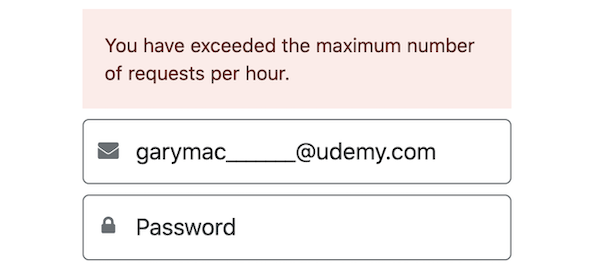
- The Udemy site is reporting I’ve “exceeded the maximum number of requests per hour”, after I tried to log in. What should I do now?
- Why am I seeing “There was a problem logging in. Check your email and password or create an account”?
- I don’t recall which email address I used to create my account.
- I’m having trouble logging in using the Apple, Google or Facebook options
Troubleshooting steps for login issues
If you can’t recall the password for your Udemy account, you can initiate a password reset and log into your account.
I was notified in a Udemy email that I have to reset my password. Why?
Our system has a range of different security measures in place to protect your account. If, for any reason these are triggered, the system will automatically ask you to reset your password as a form of account security.
The email asking you to reset your password will be sent to you via the no-reply@e.udemymail.com address.
- If you haven’t logged in for a while and have received one of these emails in your inbox, please follow the instructions in it to access your account. Once logged in, if you see activity in your account that you didn't initiate, please contact Udemy Support.
- If you have logged into your Udemy account recently and receive one of these emails:
- Do not clear the cache and cookies on the browser you were using before proceeding with the email’s instructions.
- If possible, log into Udemy from the same browser tab you used to reset your password.
Why am I being told my account doesn’t have a “usable password”, after I reset my password?
As noted above, a range of different security measures are in place to protect your account. If after resetting your password, you see a notification indicating your account does not have a usable password, this could indicate the detection of unusual activity.
If you’re encountering a notification stating your account doesn’t have a “usable password”, please do the following:
- Check your inbox for an email from our team indicating your account is in safe mode. If there are multiple emails with the same message, please open the most recent one.
- Before proceeding, do not clear the cache and cookies on the browser you were using.
- Wait 10 minutes and proceed with the instructions outlined in the most recent email from our team.
- Then, if possible, log into Udemy from the same browser tab you used to reset your password.
The Udemy site is reporting I’ve “exceeded the maximum number of requests per hour”, after I tried to log in. What should I do now?
As a security precaution, if the system detects there have been several, unsuccessful log in attempts, the log in tool will be temporarily disabled. You should be able to log in, however, by initiating a password reset.
Why am I seeing “There was a problem logging in. Check your email and password or create an account”?
This error sign indicates our system cannot find an account with login credentials that match the password and email address that have been entered. If you have signed up for Udemy before, and have an active account, please try the following:
- Initiate a password reset with the email address you believe is registered for your Udemy account.
- If you can’t recall which email address you used to sign up, please try the troubleshooting steps below to determine what email address is registered in your account.
I don’t recall which email address I used to create my account.
If you can’t remember which email address you used to create your Udemy account, please try the following:
- When you sign up to Udemy, or enroll in a course or subscription, a confirmation email is sent to the email address that’s registered to your account. Check your email accounts for messages from udemy@email.udemy.com. Be sure to check your spam or junk folders as well.
- If you locate Udemy notifications in one of your email accounts, try logging into your account with that email address.
- Please note: Udemy purchases on the mobile app are processed via the Apple App Store or Google Play. The email address you have registered for those platforms may be different from the email address you have registered for your Udemy account.
If you can’t find any confirmation emails from Udemy in your email accounts, this could indicate your email address was entered incorrectly when you first signed up to Udemy. As a result, our system would have attempted to send the confirmation email to that address, instead of the correct one. If you believe this may have happened, please contact our Support Team.
I’m having trouble logging in using the Apple, Google or Facebook options
In order to log into your Udemy account, you will need to use the same method you used to sign up. Review how to log in with the Apple, Google or Facebook options.
Comments
0 comments
Please sign in to leave a comment.