
This article outlines what tax forms and applicable documents instructors can expect from Udemy after the end of a calendar year, in return for the tax documentation that instructors have already provided to Udemy.
Additional resources:
- Information regarding what tax forms and documents instructors are required to submit to Udemy.
- Instructions on how to submit your tax forms and documents to Udemy.
- Information about Internal Revenue Service (IRS) withholding and how it is applied to Udemy instructor earnings.
Note: Udemy is not able to provide tax advice. This article is intended to outline relevant tax forms and documents instructors can expect from Udemy. For individual tax advice, please consult a tax professional.
Overview
Udemy is based in the United States, which means that we have certain obligations to the U.S. government for tax withholding and reporting.
Upon making their first sales on the platform, instructors submit U.S. IRS tax forms to Udemy. In return, in the months following the end of each calendar year, instructors can expect forms from Udemy summarizing their payout totals and withholding totals from the previous year.
While Udemy uses instructors’ submitted tax information to determine the correct amount of IRS withholding to apply to payouts, all instructors are responsible to report their earnings to the government authorities relevant to them for the purposes of income tax collection, and the 1099 or 1042-S form that instructors receive from Udemy may be helpful in that effort (see below for more information). If you have questions about what your income tax obligations are, consult the help of a tax professional.
Which tax forms will Udemy send me?
1099 forms
Instructors who provided a tax form certifying their U.S. status for tax purposes with a W-9 will receive IRS Form 1099 in return from Udemy. The form will be provided in the first quarter of 2021, reflecting the payouts and withheld amounts (if any) from the previously completed calendar year. Because Udemy implemented automated withholding in March, your forms will reflect your payments from March onwards. If you submitted tax documentation prior to March, your forms may also reflect payouts from January and/or February. More about IRS Form 1099 can be found directly at the IRS site.
If you were an instructor who received payouts in 2020, but didn’t provide Udemy with a tax form, you can expect a 1099 (detailing the maximum IRS withholding which Udemy was forced to apply).
1042-S forms
Instructors who provided tax forms certifying non-U.S. tax status (i.e. W-8BEN, W-8BEN-E most commonly) should expect Form 1042-S in return from Udemy. The form will be provided in the first quarter of 2021, reflecting the payouts and withheld amounts (if any) from the previously completed calendar year. Because Udemy implemented automated withholding in March, your forms will reflect your payments from March onwards. If you submitted tax documentation prior to March, your forms may also reflect payouts from January and/or February. More about Form 1042-S can be found directly at the IRS site.
How will I receive my 1099 or 1042-S from Udemy?
Your physical tax form will be sent to the mailing address you provided when you completed your tax documentation.
ViewMyForms.com: Udemy is partnering with 1099 Pro and their web platform ViewMyForms.com to provide electronic copies of year-end tax forms as an additional option for instructors to access their documentation.
Please note: IRS forms, emails generated from 1099 Pro, and the ViewMyForms.com platform itself are English-only. If you have questions or issues retrieving your form electronically due to a language barrier, please contact Udemy Instructor Support.
When your forms are ready, please follow the steps below to access your electronic copy.
1. Sign up on ViewMyForms.com using the email address that you provided when submitting your tax forms.
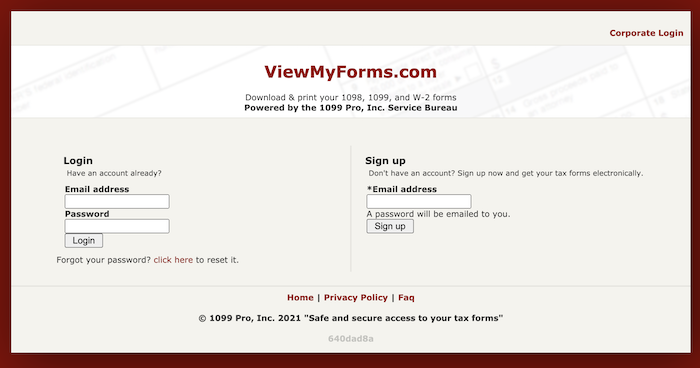 2. After signing up, you will receive an email from donotreply@viewmyforms.com with additional steps to complete the registration process. (Subject line: Please Complete the Registration Process)
3. After completing these steps, you will receive an email notifying you that your consent to electronic delivery has been completed and you will be able to access your forms at ViewMyForms.com.
4. Once you're logged in, you will see a list of any tax forms generated from your Udemy earnings (Form 1099 or Form 1042-S), with the ability to download .PDF copies for your records.
PLEASE NOTE: If you provided a Form W-9 or had tax withheld prior to submitting a tax form, a copy of your 1099 form has shipped to the address provided at the time of your submission, and a digital copy is available on-line for viewing.
If you provided any other form, such as a W-8BEN or a W-8BEN-E, you can expect a copy of Form 1042-S by mid-April, 2021.
When will I receive my tax forms?
If you provided Form W-9 or had tax withheld prior to submitting a tax form, you can expect a copy of Form 1099 by mid-February, 2021.
If you provided any other form, such as a W-8BEN or a W-8BEN-E, you can expect a copy of Form 1042-S by mid-April, 2021.
Why does my paid amount on my 1042-S appear different from what I see on my Udemy Revenue Report?
The amount shown in Line 2 of Form 1042-S (“Gross Income”), refers only to the taxable amount of income for the purpose of IRS withholding. For Udemy, this number represents only the portion of your Udemy revenue that came from sales to or subscription revenues derived from US students.
What taxes am I responsible for? What do I owe?
Udemy is not able to provide tax advice. Instructors are responsible for remitting any income tax relevant to them to their local tax authorities. Please consult a tax professional for individual tax advice, or to understand your tax responsibilities for the income you have received from Udemy.
Comments
0 comments
Please sign in to leave a comment.