
We're sorry to hear you'd like to close your Udemy account. If you're having trouble with the site, or if there's anything we can help you with before you close your account, please contact Udemy Support.
If you’ve created a course on Udemy, or you have been added as a co-instructor to a course, the steps you need to take to close your account will vary depending on a few factors.
First, you will need to take the required steps as either a Course Instructor or Course Co-Instructor outlined below, before following the steps in the Closing Your Account section
Course Instructor
Instructor of Courses with No Student Enrollments
If you’ve created draft courses on Udemy, you must delete each of the courses you created before closing your account (more info here).
If you have published any of your courses, but don’t yet have any enrolled students, unpublish the courses first, then delete them in order to close your account (more info here).
After deleting all of your courses, you can navigate to the Close Account page to permanently close your account with Udemy.
Instructor of Courses with Students Enrolled
If you have created any courses that are published or have been published in the past, and a student has enrolled in them, please contact support for further instructions on how to close your account. Note that, per our student lifetime access feature, students who have enrolled in your courses will continue to have access to them after you close your account.
Instructor of Courses in Udemy Business Content Collection
If any of your courses have been selected for inclusion in the Udemy Business content collection, please contact our Udemy Business Content team at ufbcontent@udemy.com for further assistance. Note that, per our Promotions Policy, your course will continue to be available for enrollment in the Udemy Business catalogue for a period of up to 12 months.
Course Co-Instructors
Co-Instructor with Course Manage Permissions
If you are listed as a co-instructor of a course and the original course creator has assigned you the “Manage” permission for the course, first navigate to the Course Settings page and remove yourself as a course co-instructor (directions here).
After removing yourself as a co-instructor from all courses, navigate to the Close Account section to permanently close your Udemy account.
Note: If there are any payments due to be paid to you in your Udemy Revenue Report, you won’t be able to close your account until your last scheduled payout is sent by Udemy.
Co-Instructor without Course Manage Permissions
If you are listed as a co-instructor of a course and you do not have the “Manage” permission for the course, you will need to contact the original course creator to remove you from the course (directions here).
After you’ve been removed from all courses you teach as a co-instructor, you can close your account following the steps below.
Note: If there are any payments due to be paid to you in your Udemy Revenue Report, you won’t be able to remove your account until your last scheduled payout is sent by Udemy.
Closing Your Account
Once you’ve taken the necessary steps above, you can proceed to close your account by following these steps:
1. Sign into your account.
2. Move your cursor to your avatar at the top right-hand corner of the page.
3. Click on Account in the drop-down menu
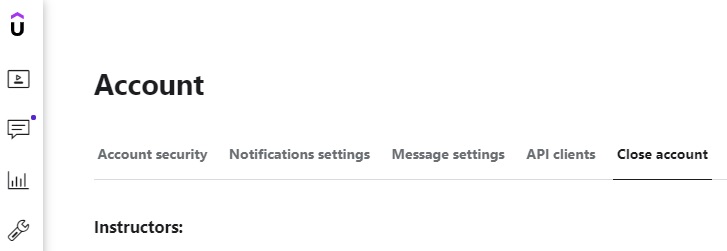
4. Next, click Close Account on the right-hand side
5. Enter your password and click Close Account again.
If you have any additional questions regarding how to close your instructor account, please contact our support team.
Comments
0 comments
Please sign in to leave a comment.