
By signing up to a Udemy subscription, students can learn what they need, when they need it, by gaining access to numerous, high quality courses. This article outlines how you can sign up to one of Udemy’s subscriptions and begin your learning experience.
Please note: currently, Udemy subscriptions are not available for all students at this time. But, rest assured, we are working hard to make our subscriptions available to more students moving forward!
How to sign up for a subscription at Udemy.com
On your Subscriptions page: you can quickly enroll in a Udemy subscription by following the steps below.
1. Navigate to your Subscriptions page (if available in your account) to review the subscription plans you’re eligible to enrol in. The Subscriptions page can be accessed from the drop-down menu at the top right of the page.
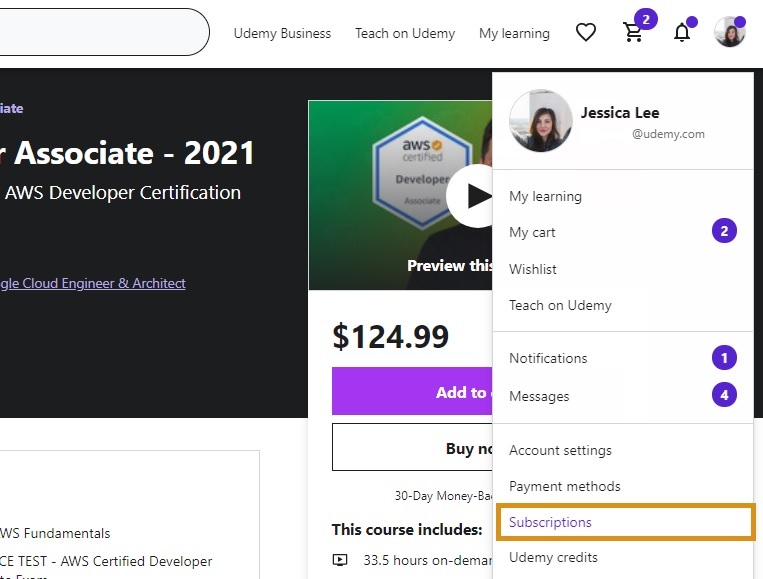
2. Click on the subscription you would like to choose and complete the checkout process. You will also see the option to try the seven day, free trial (see below).
3. After subscribing, you can access courses available to you via the Subscriptions tab on your My Learning page.
Via a course landing page: you can also sign up for a Udemy subscription through a course landing page, by following the steps below.
1. If a course is included in a subscription, you will see the option to enroll in the subscription on the course landing page at Udemy.com. You will also see the option to try the seven day, free trial (see below). Click on the option you would like to choose.
2. Enter your payment information and complete the checkout process.
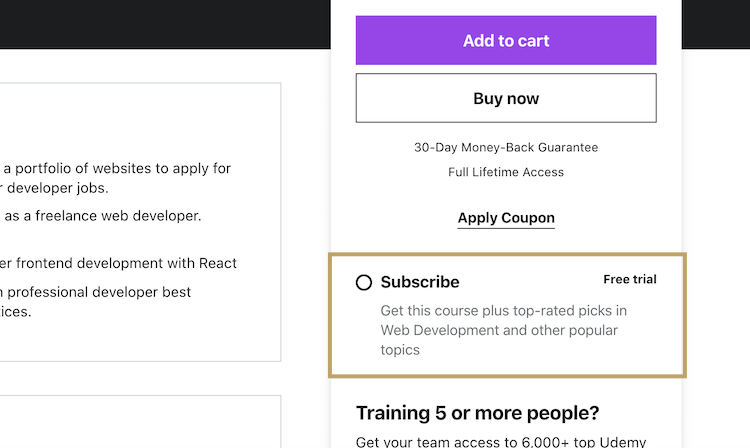
3. You can access that course, and others available to you, on the Subscriptions tab on your My Learning page.
Please note: students can only enroll in one subscription program at a time (learn how to cancel or manage your Udemy subscriptions).
Trying the free, seven day trial
You can try subscriptions free for 7 days to determine if it’s a good fit for your learning needs, by following the steps outlined above. After 7 days, your trial will automatically convert to the applicable, monthly subscription fee (plus applicable transaction taxes).
Please note: the free trial is only available to new subscribers. If you have previously accessed that particular Udemy subscription, either through a free trial or paid subscription, then you do not qualify.
Why can’t I purchase a Udemy subscription?
As noted above, currently, Udemy subscriptions are not available to all students at this time. Our team is working to make our subscriptions available to more students, so please continue to visit our site to find new products and updates.
If you’re encountering issues while attempting to make a payment for a subscription, please review How to Solve Payment Issues.
Accessing subscriptions on the Udemy mobile app
Currently, you cannot enroll in Udemy subscriptions via the Udemy mobile app. To sign-up for a subscription, you will need to be accessing Udemy.com via a desktop, laptop or mobile browser.
After you have enrolled in the subscription you will be able to access and take courses in the Personal Plan subscription on the mobile app.
Please note: at this time, some features of the Udemy Pro learning experience (i.e. coding exercises, assessments) are not accessible on the Udemy mobile app.
How can I see information about my subscription? And manage or cancel it?
Comments
0 comments
Please sign in to leave a comment.