
Instructors may wish to see their course landing page as it appears on the Udemy marketplace, or locate their course URL so they can share it with their audience. In addition, instructors may need to provide their course ID to our team when requesting support.
This article outlines how instructors can access their course ID, URL and course landing page.
How instructors can view their course landing page
Each course has a course landing page, which is the page potential students see before they enroll in your course. To locate and access your course landing page, follow the steps below.
1. Navigate to the course management page (more information can be viewed here).
2. Next, click Course landing page on the left-hand side and then Preview at the top.
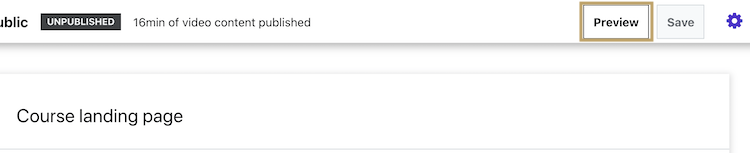
3. You will be directed to the course landing page as it appears to students.
How instructors can locate their course URL
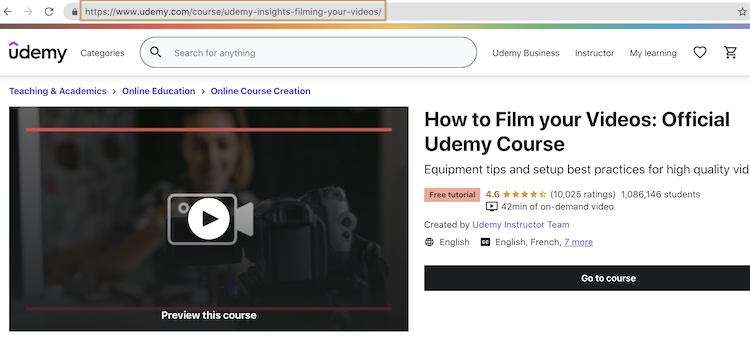
If you need to locate the URL for your course, simply follow the same steps outlined above to preview the course landing page. The course URL can be viewed at the top of the page (please note: the actual course URL does not include the characters that follow the final forward slash).
How instructors can locate their course ID
If instructors need to provide their course ID to our support team, you can quickly locate it, by following these steps:
1. Navigate to the course management page (more information can be viewed here).
2. Click on the course icon below that you need the course ID for.
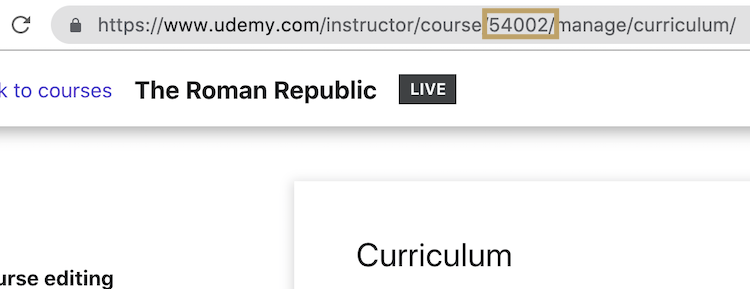
3. After the page loads look at the address bar above. The course ID is located in the middle of the URL.
Learn how to submit your course for review and choose a unique URL.
Comments
0 comments
Please sign in to leave a comment.